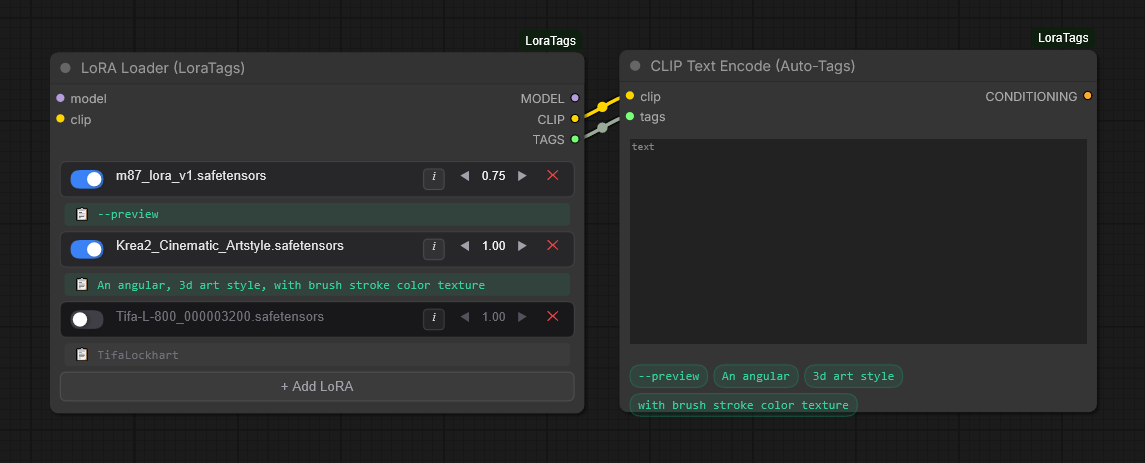
ComfyUI-LoraTags has been released—a new tool for optimizing workflows in ComfyUI. The plugin allows applying multiple LoRAs within a single node and automatically pulls metadata and trigger words directly from Civitai using the files' SHA256 hashes.

What Happened
The developer introduced ComfyUI-LoraTags, which enables infinite stacking of multiple LoRAs within one node. The tool integrates with CLIP Text Encode Auto-Tags to automatically insert tags into the text encoder, while model identification is performed by matching file SHA256 hashes with the Civitai database.
Context
When working with composite pipelines in ComfyUI, users often have to manually search for and enter trigger words for every LoRA used. This creates a high cognitive load and increases the risk of errors when constructing prompts.
Why It Matters for the Industry
The tool simplifies image generation pipelines by automating the routine work of metadata management. Using hashing to link local weights with Civitai data increases identification accuracy and could become a standard for "smart" model recognition in generative engines and agentic systems.
Why It Matters for Users
Users no longer need to manually copy tags from Civitai or keep text files with metadata alongside their models. ComfyUI "recognizes" your LoRA and automatically inserts the necessary keywords into the prompt, significantly accelerating the iterative generation process and reducing the likelihood of forgotten trigger words.
What Is Not Yet Known / Limitations
There are varying perspectives on the tool's use: ranging from pure engineering optimization to concerns regarding dependency risks on a third-party service (Civitai) and intellectual property issues.
Sources
Author
Look at AI, Editorial Team