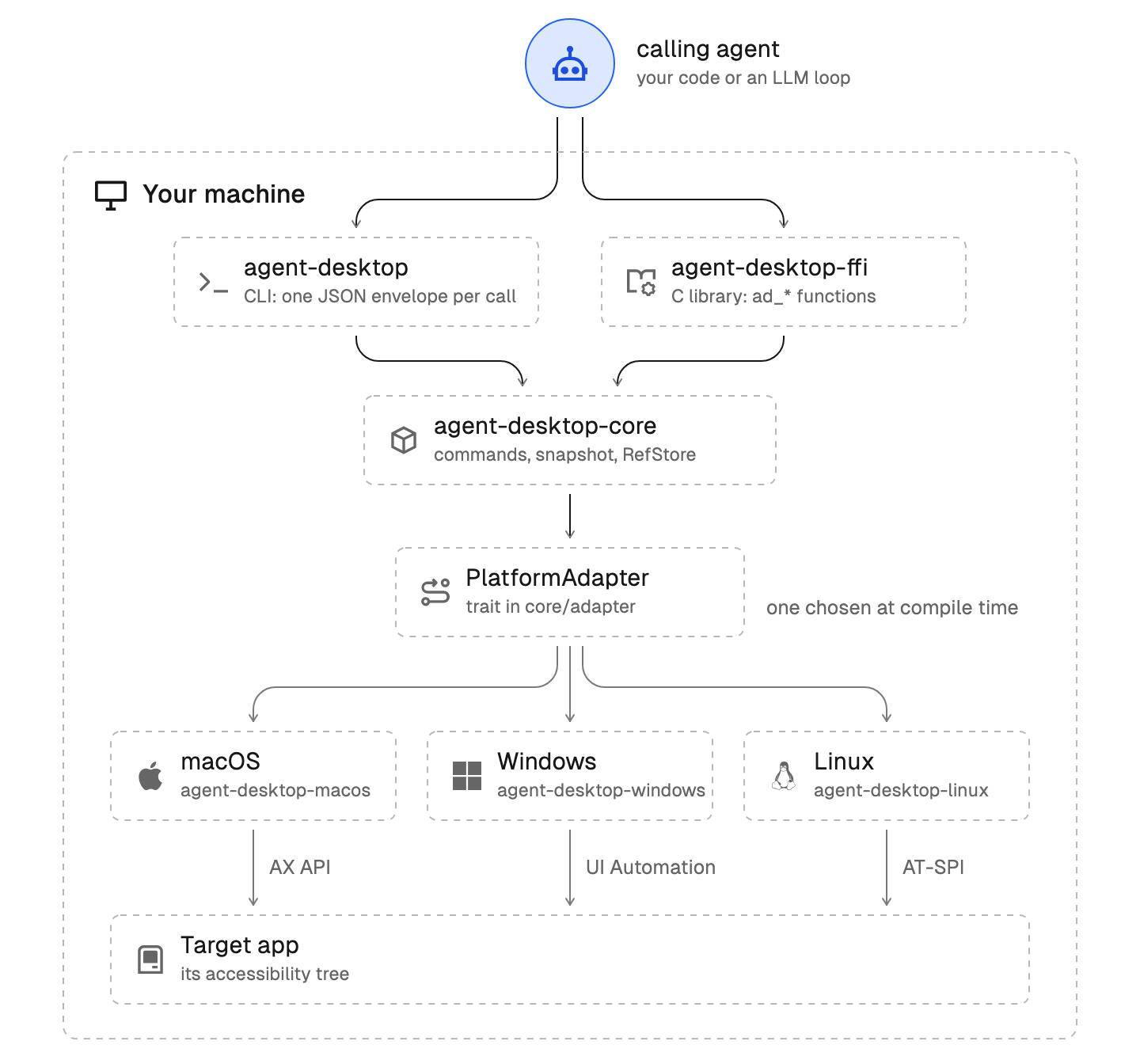
Vercel Labs has released agent-desktop, an open-source Rust tool under the Apache-2.0 license: instead of screenshots and pixel matching, it provides AI agents with desktop control via the operating system's accessibility tree—AX API on macOS, UI Automation on Windows, and AT-SPI on Linux. The interface is returned to the agent as text JSON, where each element has a ref identifier, and if the screen changes, STALE_REF or AMBIGUOUS_TARGET errors and the disposition.retry field make retries manageable and prevent the agent from duplicating actions.


What happened
Vercel Labs released agent-desktop—an open-source tool for computer use, written in Rust and distributed under the Apache-2.0 license. Instead of screenshots, it reads the operating system's accessibility tree: AX API on macOS, UI Automation on Windows, and AT-SPI on Linux. The interface snapshot is returned to the agent in JSON, where each element has its own ref: the agent clicks and types by ref, then re-reads the interface to verify the result. If the interface changes, the action returns STALE_REF or AMBIGUOUS_TARGET, and the agent takes a new snapshot; errors carry a disposition.retry field with a safe or unsafe value, so a retry does not duplicate an already executed action. By default, actions run in headless mode, without cursor movement or focus interception, while physical input is enabled with the --headed flag. The tool is installed via npm with the command npm install -g agent-desktop or via Homebrew, is available as native binaries for x64 and ARM64, and is provided as a CLI, as a C library libagent_desktop_ffi, and in MCP mode; the package includes screenshots, clipboard, traces, and a cursor overlay.
Context
Until now, typical computer agents were built on a screenshot cycle: a vision model examines a screen image, finds an element, and returns coordinates, meaning recognition remains probabilistic, and each frame costs tokens and time. The accessibility tree is a service structure that operating systems and applications maintain for screen readers, so elements in it are already semantically marked, and addressing reduces to selecting the right node rather than finding a button in an image. There is no model inside agent-desktop: the agent loop, memory, and all decisions reside entirely in the user's agent, while the overlay itself is merely an interface layer between the agent and the OS, making it vendor-neutral and compatible with any agent framework. Interest in the project is evident from repository metrics: approximately 14.6k stars and 1k forks, with three releases, from v1.0.0 to v1.1.0, within six days of the announcement.
Why this matters for the industry
For the industry, the key shift is that interface element addressing becomes deterministic: the agent's task shifts from the perceptual plane to the structural one, where it needs to find the semantically correct ref rather than determine the location of a button in an image. A text JSON snapshot instead of megabytes of images promises lower token consumption and latency where a vision model was used only for element addressing, while the retry contract with safe and unsafe fields acts as idempotency for agent actions—a rare level of attention to fault tolerance in execution tools. If other tools adopt the "snapshot + ref + disposition" format, it could evolve into an expected way to connect agents with interfaces, similar to how MCP became a standard for tool connection, and push adjacent frameworks toward compatibility and the first direct comparisons of accessibility-tree and screenshot approaches. Furthermore, the open license turns the project into a ready-made free engineering foundation for desktop agents and expands the class of tasks agents can solve on macOS, Windows, and Linux without vision.
Why this matters for users
The tool can be tried today: installation via npm or Homebrew takes minutes, and the license allows use in own products. It is enough to give the agent access to the required application so it can click and type by ref, then re-read the interface and confirm the result. While the agent automates routine tasks in the background, the cursor remains under your control and focus is not intercepted, so you can continue working on the same computer—the "agent took the user's mouse" conflict simply does not arise. This mode is suitable for automating routine desktop actions, for testing, and for embedding in own agents; it can be connected via CLI, C module, or MCP depending on how your pipeline is structured.
What is currently unknown / limitations
The provided materials contain no measurements: no comparison of token consumption, latency, or success rate against a screenshot pipeline on identical tasks, so efficiency and speed are a consequence of the architecture and a reasonable expectation, not a measured fact. The benefit depends on the quality of the accessibility tree of specific applications: if a program does not provide an a11y tree or marks it poorly, structural addressing loses its advantage. The agent loop, memory, and protection against inappropriate actions remain the responsibility of the developer, as there is no model inside agent-desktop. Predictions about format standardization and the displacement of vision approaches are interpretations of the trend, not test results.
Sources
- vercel-labs/agent-desktop: Computer Use CLI for AI agents (GitHub)
- Vercel Labs agent-desktop 1.0: Accessibility-Tree Computer Use, Snapshot Refs and the Retry Contract — Harel Asaf
- Vercel Labs ships Rust agent-desktop using OS accessibility trees — Tools4All
Author
Look at AI, editorial team